Coaches & consultants
GoHighLevel for coaches: one system to get, sign and serve clients
Most coaches juggle five or six tools to run their business. Here's how GoHighLevel puts funnels, discovery calls, payments, courses and community in one place, and the exact client journey we build.
The short answer
- GoHighLevel can run a coaching business from end to end: funnels, email and texts, discovery-call booking, payments, courses, community and testimonials.
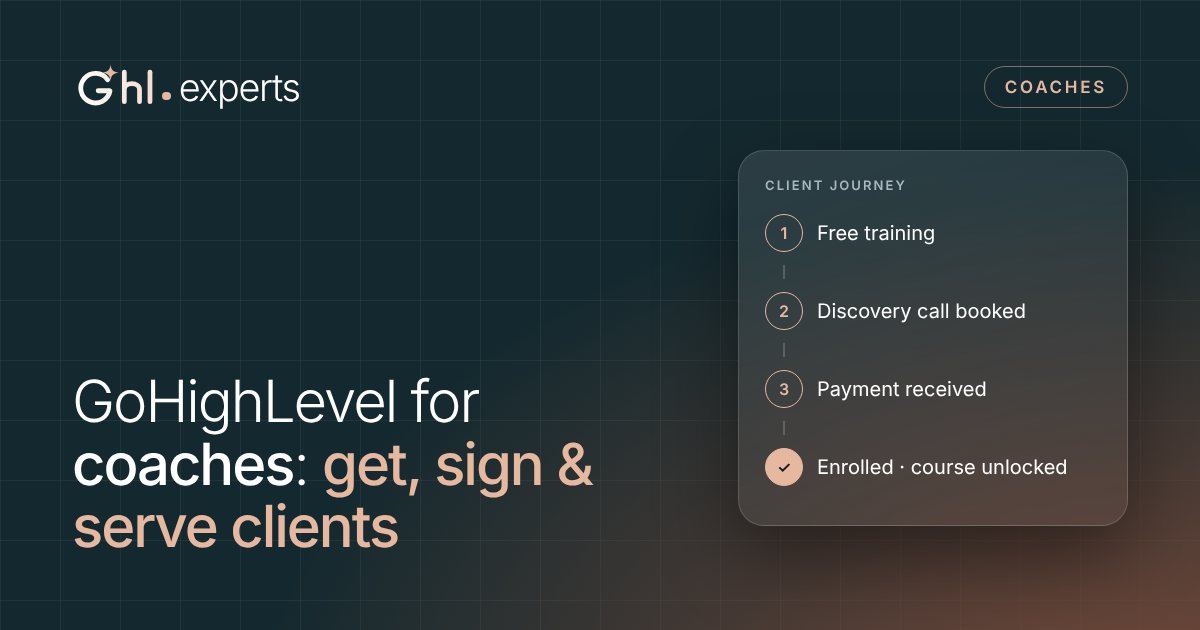
- The system we build follows one path: free training → discovery call → paid program, with automations at every step.
- The biggest wins are usually the unglamorous ones: instant replies, call reminders, a payment link straight after the call, and follow-up for everyone who doesn't book.
- With a free GoHighLevel account from us, the software bill is $0 a month plus usage.
The tool stack problem
A typical coaching business runs on a landing page builder, a scheduling app, an email tool, a payment processor, a course platform, a community app and something to glue them together. Each has its own bill and its own login.
The hand-offs between those tools are where leads and clients fall through: the call that was booked but never reminded, the payment link that was never sent, the new client who never got their course login.
What GoHighLevel replaces
| The job | Usually a separate tool | In GoHighLevel |
|---|---|---|
| Pages and funnels | Landing page builder | Funnels and websites, with forms and quizzes |
| Discovery calls | Scheduling app | Calendars with Zoom or Google Meet links and reminders |
| Email and texts | Email marketing tool | Email campaigns, SMS and automated workflows |
| Leads and clients | Spreadsheet or basic CRM | Contacts, tags and pipelines |
| Payments | Checkout tool | Payment links, invoices, subscriptions and payment plans through a provider such as Stripe |
| Courses | Course platform | Courses and memberships |
| Community | Community app | Communities with channels, events and member levels |
| Contracts | E-signature tool | Documents and contracts with e-signatures |
| Testimonials and reviews | Review tool | Review requests and reputation management |
| Social posts | Social scheduler | Social Planner |
We won't list other tools' prices here because they change often. The point is fewer moving parts: one login, one bill, and no gaps between tools.
The client journey we build
Every lead moves through a simple pipeline, so you always know who needs what:
Free training
A short video training or guide in exchange for a name, email and phone number. The thank-you page invites them to book a call.
Nurture
A short series of emails and texts over the next week: your story, a client result, an answer to the most common objection, and an invitation to book. It stops as soon as they book.
Discovery call
A booking page with three or four qualifying questions, a Zoom or Google Meet link added automatically, and reminders the day before and an hour before.
Enrol
A payment link sent right after the call, while the decision is fresh, with a payment plan option and a contract to e-sign if you use one.
Onboard
Payment kicks off the welcome: course access, a community invite, a link to book the kickoff call and a welcome message from you.
Deliver and grow
Check-ins, progress nudges for course members, renewal reminders, and on day 30 a request for a testimonial.
The automations that matter most
- Instant reply to every new lead. A text and email within seconds, with your booking link. (Here's why speed matters so much.)
- Call reminders. A confirmation, a reminder the day before and another an hour before, each with a reschedule link.
- No-show recovery. If someone misses the call, they get a text within minutes with a link to rebook.
- Payment link after the call. When you mark the call as done, the payment link goes out automatically, and the lead moves to “Enrolled” once they pay.
- Follow-up for people who don't book. Most leads won't book on day one, so a light sequence keeps you in front of them.
- Testimonial request. On day 30, a short message asks for a written or video testimonial.
- An AI agent for your DMs. Coaches get a lot of Instagram and Facebook messages. An AI agent can answer common questions, share your free training, book discovery calls and pass hot leads to you.
Courses and community, in the same place
GoHighLevel has courses and memberships built in, plus Communities for groups. In practice that means you can:
- sell a course on its own, include it in a coaching program, or give part of it away as a lead magnet
- release lessons over time, or unlock them as members make progress
- run a community with channels, events with Zoom links and reminders, and member levels that reward people for taking part
- charge for access to a group with paid plans
Because payments, courses and community live in the same system, access is given automatically the moment someone pays. Nobody has to copy emails from one tool to another.
Want this built for your coaching business?
Book a free strategy call. We'll map your client journey and give you a fixed-price plan, on a free GoHighLevel account.
Mistakes we see coaches make
- Building everything at once. Start with the path that makes money: lead → call → payment. Add the course and community once that works.
- No follow-up for people who don't book. Most of your future clients won't be ready on day one.
- No reminders. Booked calls quietly don't happen, and you never find out why.
- Messy tags and no pipeline. If you can't see where each lead is, you can't follow up properly.
- Not tracking show rate and close rate. Those two numbers tell you whether to fix your marketing or your sales call.
Related: what a free GoHighLevel account includes and costs.
Frequently asked questions
Is GoHighLevel good for coaches?
Yes, especially if you sell calls, programs or courses. It covers funnels, booking, payments, courses, community and follow-up in one place, so fewer things break between tools.
Can I host my course on GoHighLevel?
Yes. GoHighLevel has courses and memberships built in, so you can sell a course, include it in a program or use part of it as a free lead magnet.
Can I take payments and payment plans in GoHighLevel?
Yes. Connect a payment provider such as Stripe and you can use payment links, invoices, subscriptions and payment plans.
Does GoHighLevel work with Zoom?
Yes. Calendars can add a Zoom or Google Meet link to each booking automatically, along with the reminders.
Do I need to be technical?
No. We build the system and record a walkthrough video of everything, so you know how to use it.
What does it cost?
The GoHighLevel account is free with GHL Experts. You pay for texts, calls, emails and AI at cost, and a fixed price for the build if you want us to do it.
Sources
Published 10 November 2026. Prices and features were checked against HighLevel's help center on the same date.